Apple Silicon has two major AI accelerators: the Apple Neural Engine (ANE) and the GPU. Their useful distinction is the programming interface: ANE execution is compiler-managed; the GPU also exposes programmable kernels.
Hardware
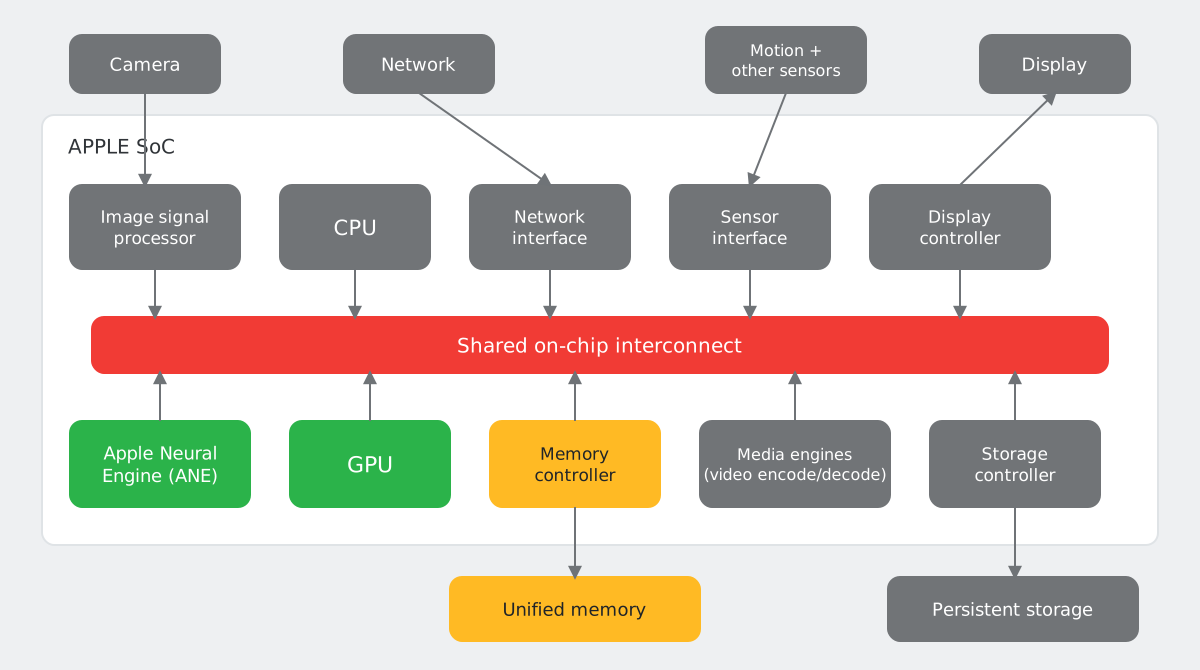
Both accelerators exist on iPhone and Mac. The Neural Accelerators inside recent GPU cores are separate from the ANE.12
| Hardware | A19 Pro (iPhone 17 Pro) | M5 Max (top configuration) |
|---|---|---|
| GPU cores | 6 | 40 |
| Neural Accelerators in GPU | Yes | Yes |
| ANE cores | 16 | 16 |
| Unified memory bandwidth | 77 GB/s (non-official) | 614 GB/s |
| GPU FP16 throughput | 12 TFLOPS (peak-guess) | 43 TFLOPS (measured) / 65 TFLOPS (peak-guess) |
| ANE throughput | FP16: 25 TFLOPS (peak-guess) | FP16: 25 TFLOPS / INT8: 50 TOPS (measured) |
The M5 Max ANE numbers are local measurements, not Apple-published peak specifications.3
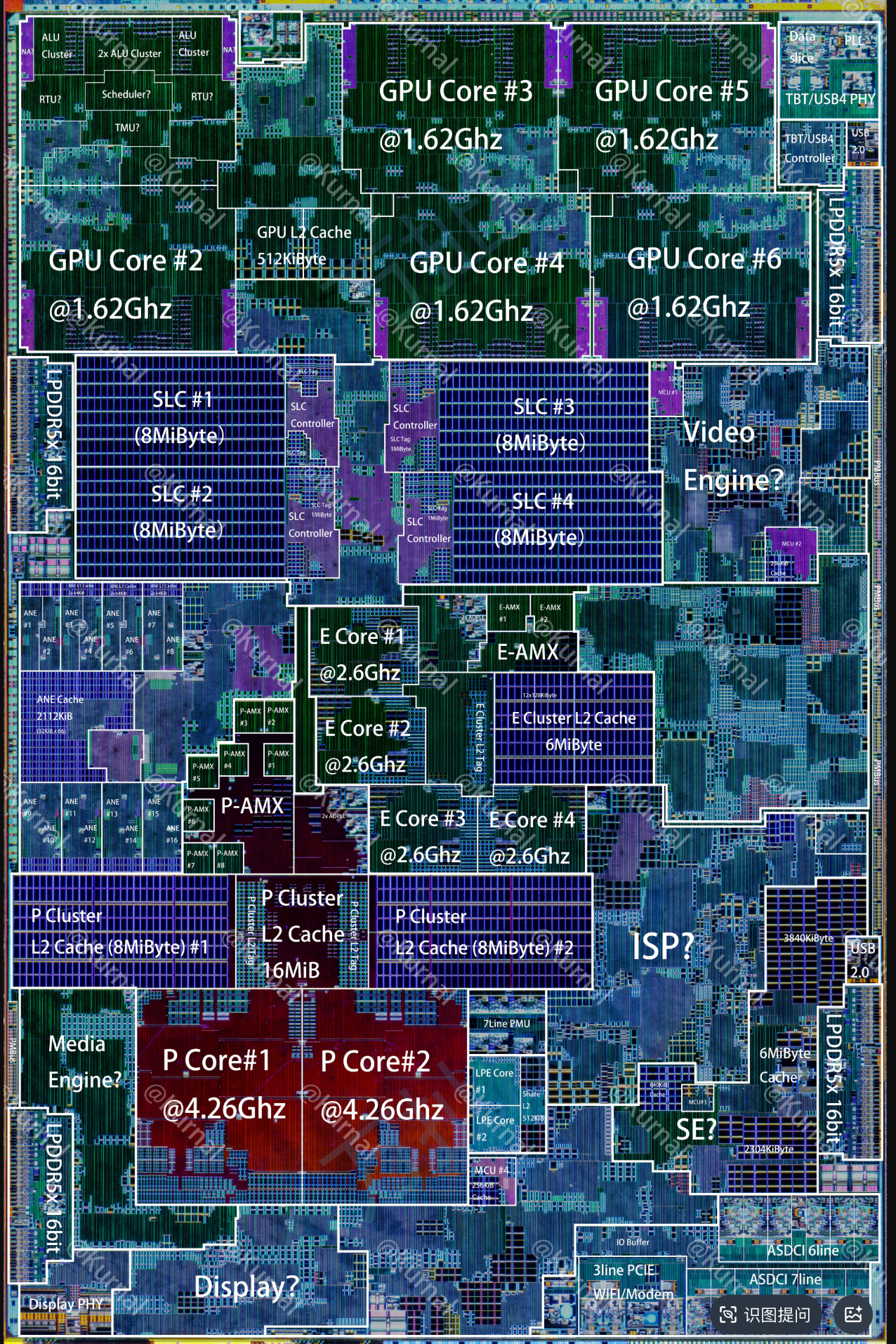
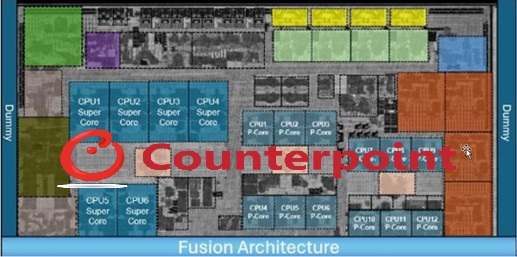
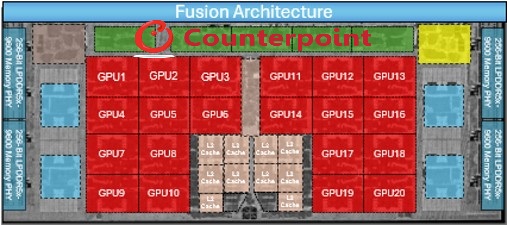
Die views: A19 Pro and M5 Pro
| Dimension | ANE | GPU |
|---|---|---|
| Role | Neural-network acceleration | Graphics and parallel compute |
| Typical use | Low-power inference | Inference, training, custom compute |
| Programming | Compiled model graphs | Tensor ops and custom kernels |
| Public APIs | Core ML | Core ML, PyTorch MPS, MLX, Metal |
For ANE internals beyond the public API, Bryngelson’s reverse-engineering study separates measured results from inferred and predicted behavior.4
Software Stack
| Accelerator | Entry point | Execution path | Control |
|---|---|---|---|
| ANE | Core ML | Compiled model -> ANE | Model deployment and placement |
| GPU | Core ML | Compiled model -> GPU | Model deployment and placement |
| GPU | PyTorch mps |
PyTorch ops -> MPS / Metal -> GPU | Tensor operations |
| GPU | MLX | Array graph -> Metal -> GPU | Operations and custom kernels |
| GPU | Metal | Kernels and command buffers -> GPU | Kernel implementation and dispatch |
Core ML / Core AI represents Apple’s model-deployment layer. Core AI evolves that role with updated runtime and export APIs; the example below uses the Core ML coremltools API.5
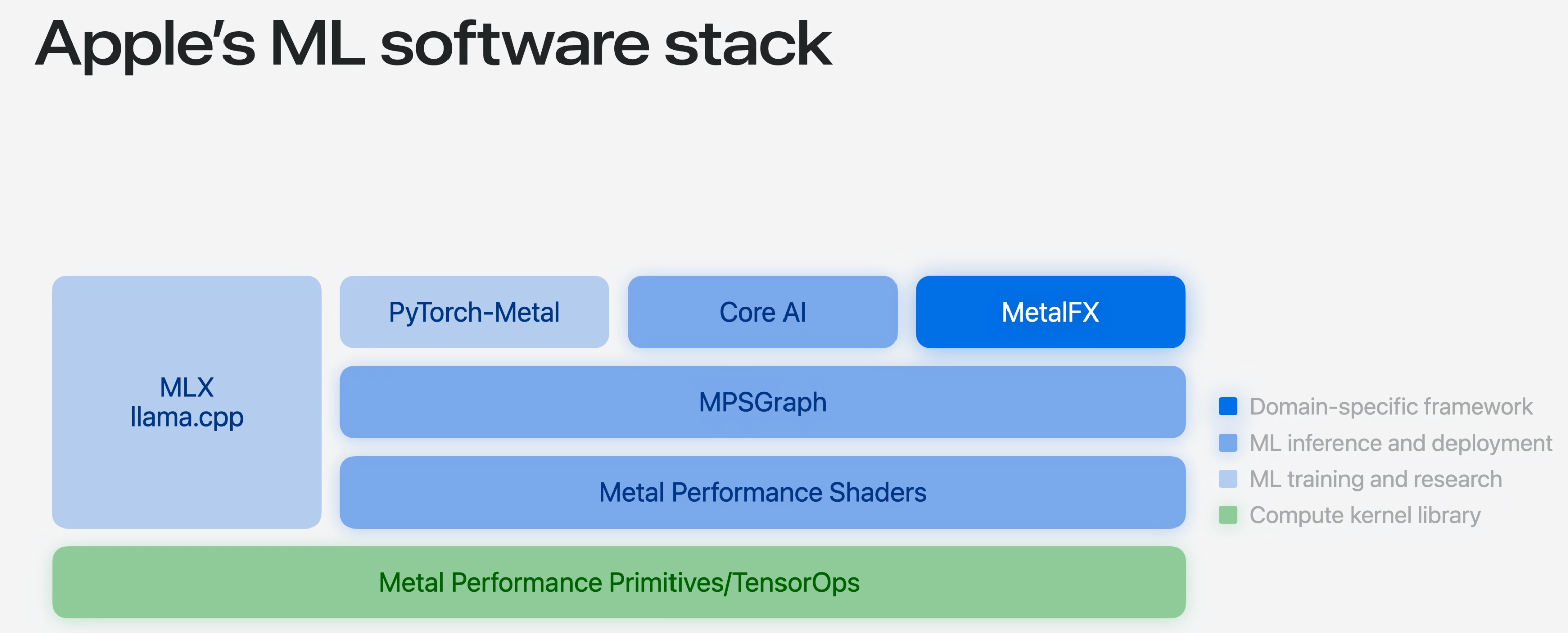
mps device to its cuda device; Metal to CUDA; Metal tensor operations to matrix primitives used by CuTe/Triton. These describe abstraction levels, not API equivalence.Core ML’s CPU_AND_NE permits CPU and ANE, excluding GPU; CPU_AND_GPU excludes ANE; ALL permits all three. These are allowed targets, not guarantees that an operation will use a particular accelerator.6
Typical Runnable Examples
ANE goes to CoreML while GPU goes to MLX
ANE path: PyTorch to Core ML
Convert four Conv2d + ReLU stages and inspect the preferred device for each operation.7
import coremltools as ct
import numpy as np
import torch


def run_coreml(model, example, package_name):
    traced = torch.jit.trace(model.eval(), example)
    mlmodel = ct.convert(
        traced,
        inputs=[ct.TensorType(name="x", shape=example.shape)],
        compute_units=ct.ComputeUnit.CPU_AND_NE,
        minimum_deployment_target=ct.target.macOS13,
    )
    mlmodel.save(f"{package_name}.mlpackage")
    print(type(mlmodel).__name__)

    result = mlmodel.predict({"x": example.numpy().astype(np.float32)})
    for name, value in result.items():
        print(name, value.shape, value.dtype)

    # Compute-plan inspection requires macOS 14.4 or newer.
    plan = ct.models.compute_plan.MLComputePlan.load_from_path(
        mlmodel.get_compiled_model_path(),
        compute_units=ct.ComputeUnit.CPU_AND_NE,
    )
    for op in plan.model_structure.program.functions["main"].block.operations:
        if op.operator_name == "const":
            continue
        usage = plan.get_compute_device_usage_for_mlprogram_operation(op)
        device = usage.preferred_compute_device if usage else None
        backend = type(device).__name__ if device is not None else "not reported"
        print(f"{op.operator_name}: planned backend = {backend}")


layers = []
for i in range(4):
    layers += [
        torch.nn.Conv2d(32 if i == 0 else 64, 64, 3, padding=1),
        torch.nn.ReLU(),
    ]
model = torch.nn.Sequential(*layers)
run_coreml(model, torch.randn(1, 32, 128, 128), "ConvStack")
Local output:
MLModel
var_53 (1, 64, 128, 128) float32
ios16.conv: planned backend = MLNeuralEngineComputeDevice
ios16.relu: planned backend = MLNeuralEngineComputeDevice
ios16.conv: planned backend = MLNeuralEngineComputeDevice
ios16.relu: planned backend = MLNeuralEngineComputeDevice
ios16.conv: planned backend = MLNeuralEngineComputeDevice
ios16.relu: planned backend = MLNeuralEngineComputeDevice
ios16.conv: planned backend = MLNeuralEngineComputeDevice
ios16.relu: planned backend = MLNeuralEngineComputeDevice
On this M1 Pro, the compute plan prefers ANE for all eight compute operations.
Backend placement depends on the workload, not just the compute_units setting.
GPU path: MLX + Metal
Write the per-thread computation in Metal; let MLX generate the signature, bind buffers, and launch it. Here each GPU thread computes one element of out = a + b.8
import mlx.core as mx

if not mx.metal.is_available():
    raise RuntimeError("A Metal GPU is required")
mx.set_default_device(mx.gpu)

add = mx.fast.metal_kernel(
    name="vector_add",
    input_names=["a", "b"],
    output_names=["out"],
    source="""
        uint i = thread_position_in_grid.x;
        out[i] = a[i] + b[i];
    """,
)
a = mx.arange(256, dtype=mx.float32)
b = mx.full((256,), 10.0, dtype=mx.float32)
(c,) = add(
    inputs=[a, b],
    grid=(a.size, 1, 1),
    threadgroup=(128, 1, 1),
    output_shapes=[a.shape],
    output_dtypes=[a.dtype],
)
mx.eval(c)
max_error = mx.max(mx.abs(c - (a + b))).item()
assert max_error == 0.0
print(mx.device_info()["device_name"])
print(c.shape, c.dtype)
print(c[:8].tolist())
print("max_abs_error:", max_error)
Local output (M1 Pro, MLX 0.32.1):
Apple M1 Pro
(256,) mlx.core.float32
[10.0, 11.0, 12.0, 13.0, 14.0, 15.0, 16.0, 17.0]
max_abs_error: 0.0
source is Metal code, not Python. thread_position_in_grid.x selects indices 0 through 255; grid counts threads, so this launch has two threadgroups of 128 threads. Each thread loads two FP32 values and writes one; no shared staging or barrier is needed. The grid exactly matches the vector length, so this example needs no bounds guard. This custom kernel bypasses Steel GEMM selection. For the source-level path from Linear through Metal dispatch, tiling, and NAX/non-NAX GEMM kernels, see MLX Metal GEMM: from dispatch to NAX.
References
-
Apple Support, “iPhone 17 Pro and iPhone 17 Pro Max - Technical Specifications”. ↩
-
Apple, “Apple debuts M5 Pro and M5 Max to supercharge the most demanding pro workflows”. ↩
-
Kaiyu Shi, local M5 Max ANE throughput measurement, September 9, 2026: 25 TFLOPS at FP16 and 50 TOPS at INT8; measured results rather than Apple-published peak specifications. ↩
-
Spencer H. Bryngelson, “Apple Neural Engine: Architecture, Programming, and Performance”. Reverse-engineered findings, not a vendor programming specification. ↩
-
Apple Developer, “Meet Core AI”, WWDC26: on-device inference across CPU, GPU, and Neural Engine, with new runtime and export APIs. ↩
-
Apple coremltools documentation, “Load and Convert Model Workflow”. ↩
-
Apple coremltools,
MLComputePlanandMLComputePlanDeviceUsage: anticipated per-operation devices and the preferred compute device. Plan inspection requires macOS 14.4 or newer. ↩ -
MLX documentation, Custom Metal Kernels: generated signatures and
dispatchThreadslaunch dimensions. Example executed locally with MLX 0.32.1. ↩
Discussion
Comments